Wearables & Gadgets
Translator Earbuds: How Live Translation Works in 2026
Quick answer
Translator earbuds pick up what someone says, send it to your phone and play the translation in your ear a moment later. The earbuds are mostly a microphone and a speaker; the phone does the translating. In 2026 you can use AirPods from $129 with a recent iPhone, Pixel Buds from $129 with a Gemini-compatible Android phone, or Timekettle's W4 Pro at $449, each with its own language list.
On this page
- How do translator earbuds work?
- What does Live Translation on AirPods need?
- What do Pixel Buds offer for live translation?
- What does Timekettle's W4 Pro do differently?
- How do AirPods, Pixel Buds and Timekettle compare?
- Can translator earbuds work without internet?
- What should you check before buying?
- Which translator earbuds fit which person?
- FAQ
- Sources
Putting in a pair of earbuds and understanding someone who speaks another language is now partly real. Apple, Google and a few specialist companies build live translation into earbuds, and each has its own list of languages, its own phone requirements and its own limits.
This guide explains how the feature works, then compares Apple's AirPods, Google's Pixel Buds and Timekettle's W4 Pro using the companies' own pages. I read the prices and specifications on October 29, 2026; each source is listed with its date at the end.
How do translator earbuds work?
The earbuds are mostly a microphone and a speaker. The translating happens in an app on your phone. When someone speaks, the earbud microphones pick up the voice and send it to the phone. The app turns the speech into text, translates it and speaks it back, and the result plays in your ear. Apple adds that in a noisy place you can move your iPhone closer to the speaker, because the phone's own microphones then help.
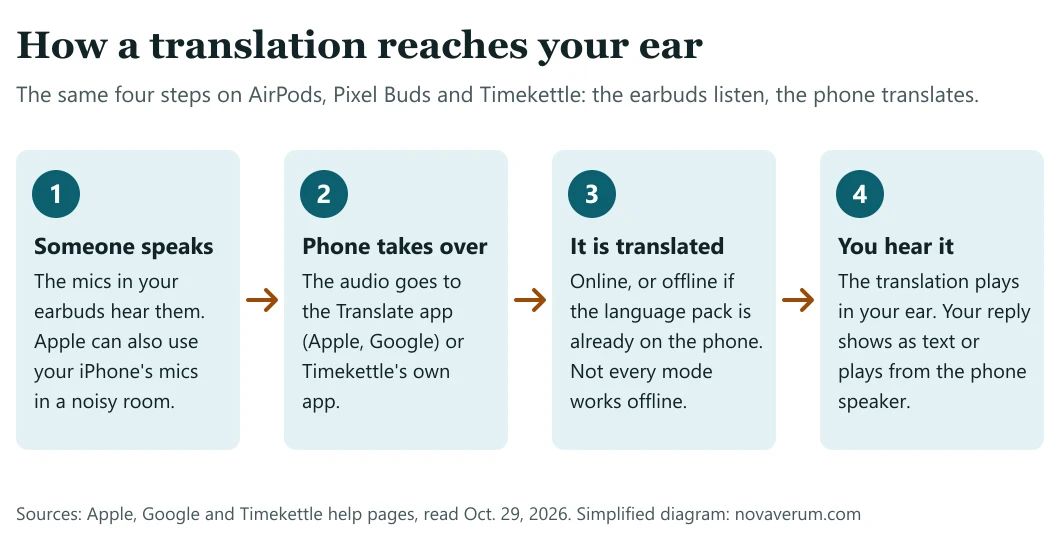
Your own replies work differently on each system. With AirPods, you speak and then show a transcript on the iPhone or play the translation from its speaker, unless the other person also wears supported AirPods. In Google's Conversation mode, your speech plays aloud through your phone's speaker while the other person's translated speech plays privately in your earbud.
None of this is instant. Google's help page says translation "isn't instantaneous," and Apple says Live Translation uses generative models whose outputs may be inaccurate, unexpected or offensive, so important information should be checked. I use AI tools every day, so I take Apple's own warning that translations may be inaccurate at face value.
What does Live Translation on AirPods need?
Apple's support page, published September 14, 2026, lists the requirements. You need AirPods 4 with Active Noise Cancellation, AirPods 5 (both models), AirPods Pro 2, AirPods Pro 3 or AirPods Max 2. You also need an iPhone 15 Pro or later on iOS 26 or later, with Apple Intelligence turned on, Apple's Translate app and the latest AirPods firmware.
Apple's page of October 22, 2026, lists nine languages: English (US and UK), French, German, Italian, Japanese, Korean, Portuguese, Spanish and Mandarin Chinese, in simplified and traditional versions. The Portuguese is Brazilian and the Spanish is the Spain version. Apple labels the feature beta and says it is available in select languages and regions. For me the language list is the first thing to check, before price or design.
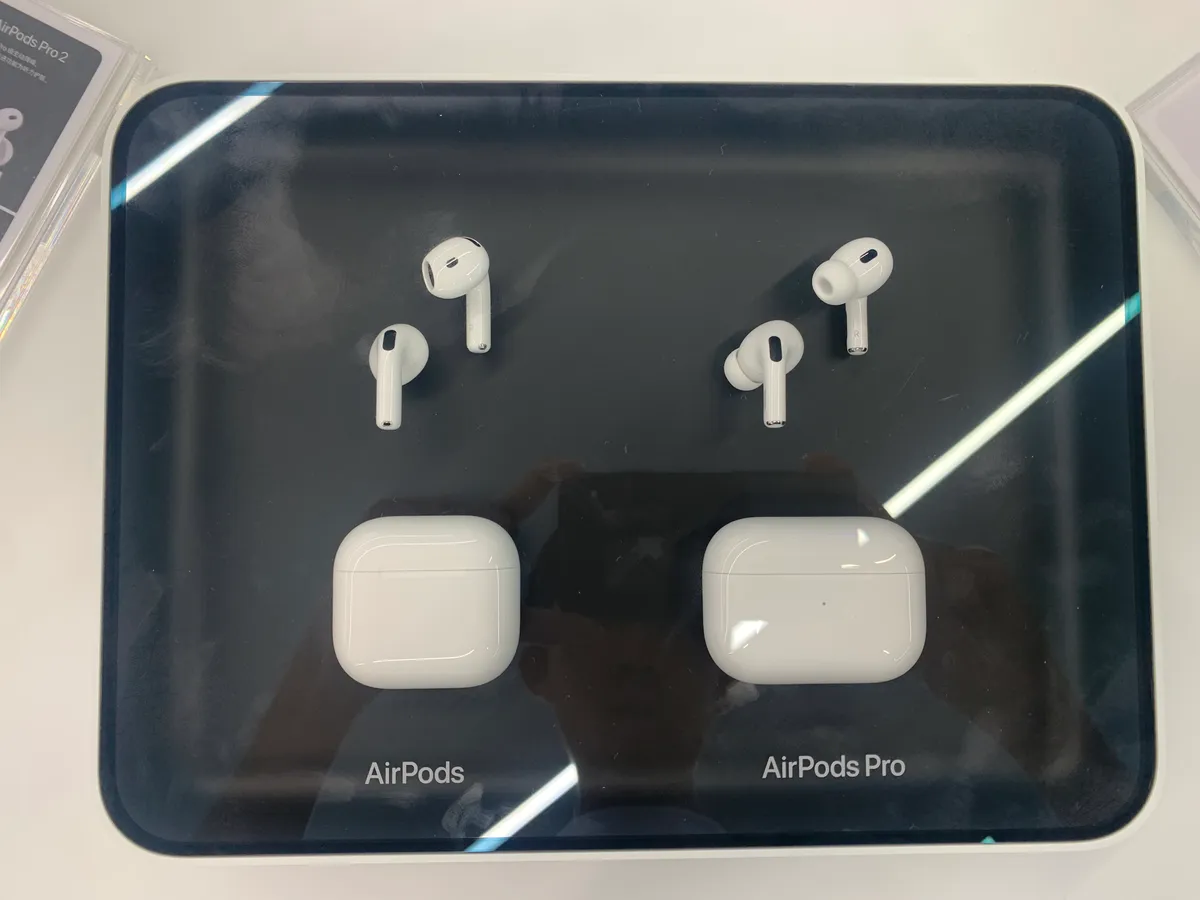
You download the languages first: the one the other person speaks and the one you want to hear. Apple says that once the language models are on your iPhone, all processing takes place on the phone and your conversation data stays private. To start, you can press and hold the stems of both AirPods, use the Translate app, press the iPhone's Action button or ask Siri. If the other person has no AirPods, you show them the transcript or play your translated reply from the iPhone speaker.
In Apple's store, AirPods 5 cost $129, or $149 with the wireless charging case. AirPods Pro 3 cost $249 and AirPods Max 2 cost $549. The AirPods 5 at $129 are the lowest price on Apple's comparison.
What do Pixel Buds offer for live translation?
Google's Pixel Buds help page describes two modes in the Google Translate app. In Listening mode, you press and hold a bud, or say "Hey Google, translate for me," and the translated audio streams into your ear while your phone stays in your pocket. In Conversation mode, your speech plays aloud through the phone's speaker and the other person's translated speech plays privately in your earbud, with automatic noise cancellation.
You do not need a Pixel phone. Google lists a Gemini-compatible Android device with Gemini as the default voice assistant and Live Translate permissions turned on, the latest Google and Google Translate apps, and an internet connection. Google also writes that Google Translate works with "all Gemini-optimized headphones," so check your own earbuds before assuming they work.
The help page lists 40 languages, among them Arabic, Chinese (Mandarin only), English, French, German, Hindi, Italian, Japanese, Korean, Portuguese, Russian, Spanish and Turkish. That is more than four times Apple's list.
The Google Store lists Pixel Buds Pro 2 at $229 and Pixel Buds 2a at $129. Its Live Translate article adds that Pixel phones can also translate phone calls in the speaker's own voice, in select countries and languages.
What does Timekettle's W4 Pro do differently?
Timekettle sells earbuds built around translation. The W4 Pro costs $449 and works through the Timekettle app on a smartphone. Its page lists a one-on-one conversation mode, a listen-and-play mode for meetings and talks, and translation of phone calls and videos. For calls, Timekettle says only one person needs to wear the earbuds: both people speak their own language and the W4 Pro captures, translates and transcribes the call. It lists up to six hours of continuous translation, with an extra hour for every 10-minute charge.
The numbers on the page do not all agree. The headline says 54 languages and 108 accents, while the FAQ lists 52 languages and 106 accents. The headline also says "25 pairs offline," while the FAQ describes 13 offline packs, all pairing English or Chinese with another language. Timekettle says two offline pairs are free with coupons and further pairs cost $10 each or come with a paid subscription. I would not call that a flaw in the earbuds, but I do prefer a maker that keeps its own numbers consistent.
The company says the one-on-one and listen-and-play modes work online and offline, while video translation needs a connection. A cheaper W4 appears in Timekettle's comparison table at $279.20 against a $349 list price.
How do AirPods, Pixel Buds and Timekettle compare?
| AirPods (Apple) | Pixel Buds (Google) | W4 Pro (Timekettle) | |
|---|---|---|---|
| Price | AirPods 5 $129, Pro 3 $249, Max 2 $549 | Buds 2a $129, Buds Pro 2 $229 | $449 |
| Languages | Nine, including Brazilian Portuguese and Spain Spanish | 40 on the help page | 52 to 54, depending on where you read the page |
| What you need | iPhone 15 Pro or later, iOS 26, Apple Intelligence, Translate app | Gemini-compatible Android phone, Google and Translate apps | Timekettle app on a smartphone |
| Offline | Yes, after downloading the languages | Help page lists internet; also advises language packs | Some modes, a limited list of pairs |
| The other person | Reads a transcript or hears playback on the iPhone | Hears your speech from the phone speaker | Needs no earbuds on calls |
Live translation on three kinds of earbuds, from the makers' own pages, read Oct. 29, 2026.
Can translator earbuds work without internet?
Sometimes, if you prepare. Apple's model is the clearest: download the languages first and the processing happens on the iPhone. Google is less consistent. Its Pixel Buds help page lists an internet connection as a requirement, yet its tips say to download language packs for uninterrupted offline translation, and the Google Store says Pixel phones translate even without a strong connection, thanks to the Tensor chip. Timekettle's offline mode covers a short list of pairs and only some modes.
Before a trip, download the languages on your phone, switch on airplane mode and run a test conversation. If it fails at home, it will fail abroad.
What should you check before buying?
- Your phone. AirPods need an iPhone 15 Pro or later. Pixel Buds need a Gemini-compatible Android phone. An older phone may rule out the cheapest option.
- Your exact language pair. Apple's Portuguese is Brazilian and its Spanish is from Spain. Google lists Mandarin only for Chinese. Check the pair you need, and check whether it works offline.
- The other person. Face to face, a transcript on your phone may be enough. On a call, only Timekettle says the other person needs nothing.
- The label and the fine print. Apple calls Live Translation a beta, and Timekettle charges for offline pairs beyond the free ones.
- What you already own. Supported AirPods or Pixel Buds may already do this at no extra cost.
Glasses can translate too: my smart glasses guide covers the Even G2, whose page lists translation in 35 languages. Features that depend on a company's servers can also disappear, as my Humane AI Pin guide shows. And if a video shows earbuds translating any language instantly in a loud street, my guide to spotting a fake gadget video shows how to check it.
Which translator earbuds fit which person?
If you own a recent iPhone, AirPods are the simplest start, from $129, with the limit of nine languages. If you use a Gemini-compatible Android phone, or need a language outside Apple's list, Pixel Buds from $129 and Google's 40-language list are the wider choice. If you want a dedicated translator for meetings and calls, and accept $449 and a separate app, Timekettle's W4 Pro is built for that. If you already own supported AirPods or Pixel Buds, try the built-in feature before buying anything else.
Frequently asked questions
Do translator earbuds work without internet?
Some do, after you download languages. Apple says that once the language models are on your iPhone, all processing takes place on the phone. Google lists an internet connection for Pixel Buds but also advises downloading language packs, and Timekettle offers offline translation for a limited list of language pairs.
Which AirPods support Live Translation?
Apple lists AirPods 4 with Active Noise Cancellation, AirPods 5 (both models), AirPods Pro 2, AirPods Pro 3 and AirPods Max 2. You also need an iPhone 15 Pro or later on iOS 26 or later with Apple Intelligence turned on.
Do Pixel Buds translate on an iPhone?
Google's help page lists a Gemini-compatible Android device as a requirement and does not list an iPhone. Pixel Buds also do not need a Pixel phone; other compatible Android phones qualify.
How many languages do translator earbuds support?
Apple lists nine languages for AirPods, Google lists 40 for Pixel Buds and Timekettle lists 52 to 54 for the W4 Pro, depending on which part of its page you read.
Does the other person need earbuds too?
Not on most systems. With AirPods they can read a transcript or hear playback on your iPhone. With Pixel Buds they hear your speech from the phone speaker. Timekettle says only one person needs to wear the earbuds on a call.
How much do translator earbuds cost?
Apple lists AirPods 5 from $129, Google lists Pixel Buds 2a at $129 and Pixel Buds Pro 2 at $229, and Timekettle lists the W4 Pro at $449. Timekettle charges extra for offline pairs beyond the free ones.
Are live translations accurate?
Not always. Apple says outputs may be inaccurate, unexpected or offensive and should be checked, and Google says translation is not instantaneous. Treat them as a help for travel and simple conversations.
Sources
- Apple Support: Use Live Translation with your AirPods (published Sept. 14, 2026)
- Apple Support: Apple Intelligence supported languages and features (published Oct. 22, 2026)
- Apple Store: AirPods prices and comparison, read Oct. 29, 2026
- Google Pixel Buds Help: Translate with Google Pixel Buds, read Oct. 29, 2026
- Google Store: Pixel Buds Pro 2, read Oct. 29, 2026
- Google Store: Pixel Buds 2a, read Oct. 29, 2026
- Google Store: Live Translate on Google Pixel, read Oct. 29, 2026
- Timekettle: W4 Pro AI Interpreter Earbuds (price, languages, FAQ), read Oct. 29, 2026

Founder and editor, Novaverum
I write Novaverum to separate the technology you can really buy from the demos, concepts and viral fakes, starting from what the companies, regulators and engineers publish. Every article lists its sources at the end.